DigiStorm is a SSO application, and assignment must point to a user’s organisation account so they can successfully sign in (Either “firstname.lastname@theindustryschool.com.au” or firstname.lastname@aitc.qld.edu.au).
Access DigiStorm from
Grant access instructions
Navigate to Settings > Users, then Click New user: 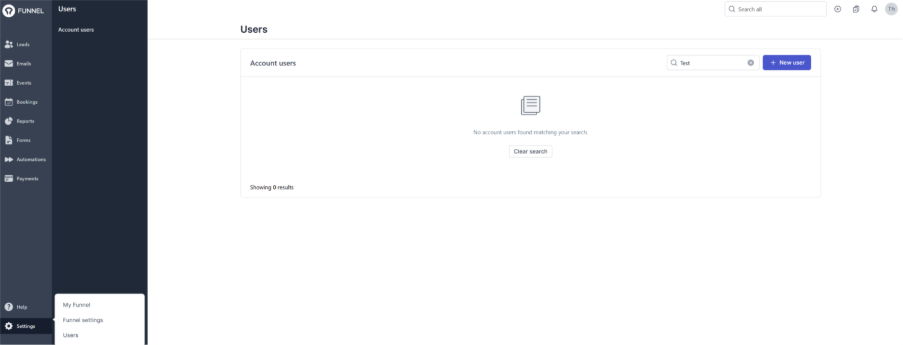
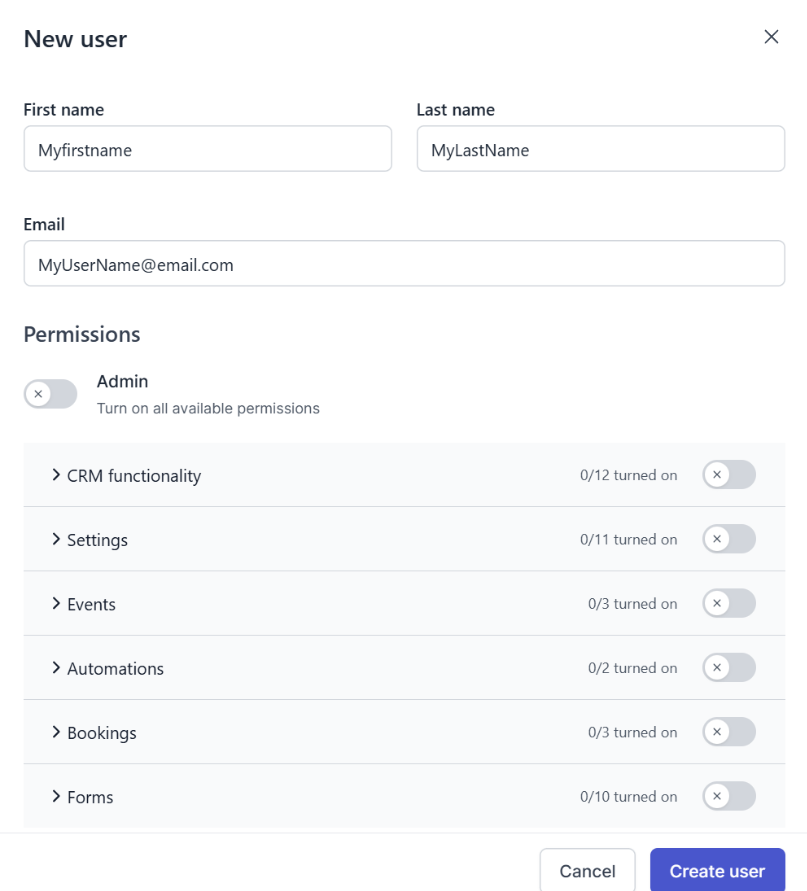
In New User page:
Enter a first name, last name and email address.
The email address must be the matching username of the person being granted access to;
IE Either “firstname.lastname@theindustryschool.com.au” or “firstname.lastname@aitc.qld.edu.au”
Select permissions the user needs.
Permissions map to DigiStorm Funnel modules (see the app blade).
Admin grants access to all, include user management. This is a protected role as this user has full access, and a limited number of people need access (only people managing this application).
Was this article helpful?
That’s Great!
Thank you for your feedback
Sorry! We couldn't be helpful
Thank you for your feedback
Feedback sent
We appreciate your effort and will try to fix the article